Showing posts with label iOS 8. Show all posts

Monday, December 1, 2014

iOS 8.1.1 and 8.2: TAIS published Jailbreak


The hacker group TAIS has released a jailbreak for iOS 8.1.1 and the beta of iOS 8.2. It allows users to their iPhone 6, iPad Air 2 and other iOS devices from the App Store forced free. The publication provides to the community but for trouble. For they could make it difficult to jailbreak iOS 8.2.

In mid-November Apple iOS 8.1.1 has released. The update is primarily intended Performance older devices such as the iPad 2 on iOS 8 improve. At the same time Apple closed the update also a gap , this is it so far allowed users to free their iOS device from the App Store coercion. But now the Chinese hacker group TAIS has released a jailbreak for iOS 8.1.1. It works with all iOS devices such as the 8- 6 iPhone or iPad Air 2 .


Trouble at the Apple fan base

However, the release of the jailbreak, acting under the Apple fans for trouble. Because in a few weeks Apple will release a major update with 8.2 iOS - and thus probably close now pointed out by TAIS gap in the system. A jailbreak would then only once no longer possible. Hackers would first have to find a new space for this in the operating system.

So ... Was it really worth pushing another jailbreak 8.1 When something quietly being signed? Oo (8.1.1 has hardly any changes)
- IH8sn0w (@ iH8sn0w) 29th November 2014

Other jailbreak developers therefore see the publication to be unnecessary. Finally, there is currently a downgrade from iOS 8.1.1 to iOS 8.1, for which there is already a jailbreak possible. The TAIS team wasting so "unnecessary" discovered a gap - so the accusation from the developer community.

To anyone wondering "why right now": My guess is Pangu and TAIS are Essentially racing each other in this space, and there's big $$ Involved
- MuscleNerd (MuscleNerd) 29th November 2014


The prominent hacker MuscleNerd suspected financial interests behind the publication. The TAIS team is competing with the hacker group Pangu, already on a jailbreak for iOS 8.2 should work. According to the TAIS now published jailbreak will work under iOS 8.2. According iDownloadblog.com the jailbreak does not work with the beta version of iOS 8.2.

More Articles You May Like:

How to Backup a Jailbroken iPhone >

How to Recover Deleted Notes on iPhone 6 (Plus) Quickly >

How to Retrieve Deleted Text Messages from iPhone 6 (Plus) >


Friday, November 14, 2014

No faulty memory in the iPhone 6 Plus


Last week, rumors began circulating after which Apple would call the 128 GB model of iPhone 6 Plus because of an error with the internal memory. Now Apple denied these reports.

Apple has currently not easy to make the customer's current-generation iPhone without restrictions tasty - make reports about himself bending and hair outlier units for over a month the round. In recent weeks, was also heard on an error after the 128-GB version of the iPhone 6 Plus inclined to regular system crash. The reason for this problem, the business magazine Business Korea claims to have made over their own resources an error in the NAND flash memory trace. It was suspected due to this potenzuellen hardware defect that Apple would recall all previously sold units of the iPhone 6 Plus with 128 GB of memory.

Now the Apple Fanblog 9to5Mac has obtained a denial from Apple. So the error does not seem to be found in the built-in flash memory of TLC and also occur only in relatively few users. As the entry is to be found in the official Apple forum, contact the crashes and boot loops more then on, when you have many applications installed on the device and these were played through a device-restore - ie when changing from an older to a new iPhone. Apple is aware of the problem and working on a solution, but the built-in memory is not just the land and therefore a recall would not be started also. Moreover, not only the iPhone 6 Plus is affected by this bug.

With the recently rolled out update to iOS 8.1, the error was at least not yet resolved. It is possible that Apple will fix a corresponding fix in one of the following maintenance updates - iOS 8.1.1 was delivered last week and seems already to developer so shortly before a standing rollout. Allegedly are running iOS 8.2 and iOS 8.3 even slightly larger updates in development at Apple.

More Related Articles You May Like:

The Most Common iOS 8 Update Problems and Solutions >

How to Prepare Your Devices for iOS 8 >

What Need to Do After iOS 8 Update >


Wednesday, October 29, 2014

iPhone 6: So it increased after the iOS 8.1 update battery life

On October 21, Apple has released the update to iOS 8.1 and released for download. With the first major update many problems to be solved, which occurred in September after the launch of iOS 8. But some users complain after upgrading to iOS 8.1 on low battery life. In this article you will know how easy it is to fix the bug on some devices and how you can save with your current iPhone.

The battery life is to update a frequent point of criticism that is frequently difficult to assess. On the one hand, the low battery life is often a sense of the user, since the operating time of your iPhone or iPad is essentially determined by the type of use. Finally, the battery life is always too low - no matter how long he holds out. 

But after updating to iOS 8.1, the faster discharge of the battery seems to be not only an imagination of the user. This affects the new iPhone 6 and iPhone 6 Plus and the iPhone 5s models. Since this does not affect all Apple devices, there is evidently no general bug. Presumably there after updating to iOS 8.1 on some devices, problems with "old" settings, the 8.1 does not harmonize with the settings of iOS. This trick could help you on your iPhone or iPad to stop the rapid discharge of the battery: 


Reset the settings on the iPhone.
Go to settings > General > Reset > Reset All Settings > Enter Your Pin Code > Reset all Setting.

Warning: Resetting the settings also known WLAN networks, the code lock and the settings of the fingerprint scanner will be deleted. This you have to re-enter then. So you should have ready some time and your wireless password.

Eight power-saving tips under iOS 8 - so you increase the battery life:

- Turn off Auto-Brightness and keep Brightness in low level.
- Close the background apps.
- Disable Location Services.
- Fetch Email Less Often.
- Lock the Screen By Hand.
- Turn Off Vibrations.
- Disable Ping.
- Push notifications for email.

Note: You can get more useful tips and tricks for iOS 8 on this page: What to Do After iOS 8 Update >


More Related Articles:


Saturday, September 27, 2014

iPhone: Apple updates iOS 8.0.1 removed in emergency


Update September 25: Apple released iOS 8.0.1 yesterday's patch, a first update for iOS 8 which was immediately withdrawn by the American group, after complaints from many users for a total loss of 3G / 4G, and dysfunction of their Touch ID reader, making them completely unusable iPhone 5. Apple is working already in the online publication of a new iOS 8.0.2 patch. A more painful than launch Apple's new iOS ...


Soon an update iOS 8.0.1

The latest version of iOS is the happiness (or not) for many Apple users for a week now, especially those with a recent terminal. Indeed, the iPhone 4S and iPad Mini having some trouble with the new iOS Apple 8, difficulties related mainly to the lack of power of the terminal, which is struggling to handle the new OS. However, the latest Apple mobile operating system also suffers from a few small teething quite annoying at times, so that the Cupertino company has already in its pipes a new update iOS 8.0.1.


A fix would be being tested by some operators and could happen in just a few days on our iPhone, iPod and iPad. Thus, according to MacRumors, the new iOS 8.0.1 would fix a particular bug in the phone section, at the call transfer, but also met some freeze when trying to access their mail. The keyboard is also corrected following a bug in iCloud keychain, plus a desire to share with the AirDrop feature in PassBook. The Safari browser also benefit from a small patch, it no longer able to launch some videos. It is hoped that this new iOS 8.0.1 also will overcome some problems encountered by some when switching Portrait / Landscape.

Obviously, other small bugs (more minor) should also be corrected with this new update. Recall that according to Apple, iOS 8 is already installed on over 46% of compatible devices.

More Related Articles:


Friday, September 12, 2014

iOS 8: this is what will change for emails on iPhone and iPad


Since the beginning, we try to present to you, one after the other new iOS 8. Today it is the mail app you'll be interested. This year no great revolution in the program, but several handy improvements which should make it more convenient in everyday life.

Mail management or drafts, we see what Apple store for its email client on iPhone as on iPad:

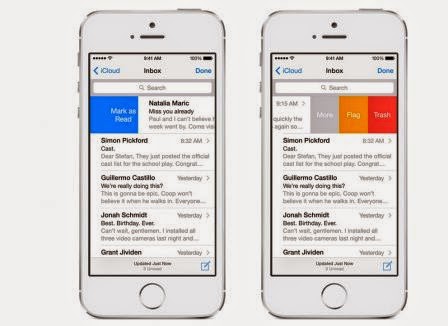
As I said earlier, this year, the Mail application is the watchword improvement. Today when we consult the list of emails, a shift from right to left brings up a menu of both boxes.

The first simply proposes to delete mail while the second provides access to a full menu and transfer, mark or move mail.


iOS 8, ​​the same gesture will have a slightly different effect.

As we have seen in many alternative apps, sliding across the surface of the screen to delete the email without clicking. A shorter shift will in turn appear three boxes:
The first sends the mail to the trash
the second to add a flag e
Does the third to access the menu. This menu a new entry 'Notify Me' also appeared.


A shift in the other direction will effectively mark the message as read or not. The same sliding longer will effectively perform the action without having to press again on the screen.


iOS 8, a swipe down to hide the draft and to access their emails. When the information sought and eventually copied the draft is active again by simply pressing the bottom of the screen. It's simple, but very practical.

Evolution, not revolution, then, but the innovations introduced with iOS 8 should help to make it more user-friendly and practical application.

Related Posts:


Thursday, September 11, 2014

iOS 8 arrives: Here are all you need to know about the top new iPhone/iPad

Only a few hours waiting to see the official iPhone 6 This will at the conference this Tuesday, Sept. 9 (Continued here on LIVE.iPhon.fr). As Apple has used the outlet of the new smartphones should then be done very quickly and shortly before, we should also take advantage of iOS 8. 


Conventional

To wait, here's a review of the various reports and articles "focus iOS 8" published in recent weeks. We have tried to detail the main new iOS 8:

Whichever version of iOS, there are features that are essential, even inseparable from the system. This is for example the case of iMessage but also mails or Safari. Even if they are embedded deep in the system, Apple takes care year after year, to improve the operation, to bring a few changes there to try to make it even better ...


App Store

Who said iPhone or iPad App Store and necessarily mean, of course, also has the right to its small annual facelift. Even better, the App Store can now be toured family due to the newness of the year: family sharing to (re) discover just below:


In addition to these improvements, these small and sometimes big plus Apple has added here and there, iOS 8 is also packed with new features like widgets, extensions ... that leave almost carte blanche to developers to make us dream both at home and at work or doing sports:


Sunday, September 7, 2014

Apple Protects Data Collected Via HealthKit in iOS 8


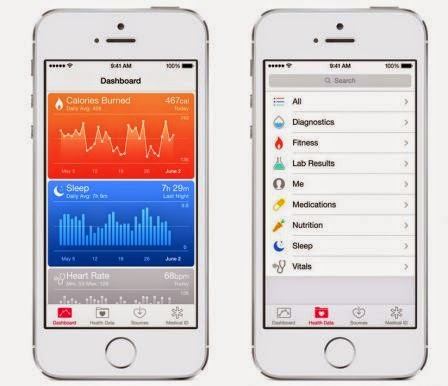
It's probably in September iOS 8 will be in the hands of the general public. Among the novelties presented at the keynote in June, the health component is one of the largest. and Apple has thought of everything.

With Healthkit, developers who wish may decide to connect their iOS application to send the collected data to the Health application.


To prevent overflow, Apple chose to take precautions:

This is the Financial Times discovered this by looking closely at what Apple requires developers in exchange for access to Healthkit API. We learn that Apple banned developers to sell the collected data to a third party.


Knowing that we are talking about physical, or physiological, it's a great thing, because obviously it would have been very tempting to sell, for example, advertising platforms, information collected via Healthkit. One exception, the data can be provided to health services obviously with the consent of the user.

Apple has preferred to protect it from the start and added that applications will offer the user a privacy policy that it would be better to take the time to read.

Related Reading: